Sunsama Discount Code 2025 – Get 30 Days Free (Not 14)

Sunsama logo

Sunsama forces you to plan realistically. If you’re juggling 5+ tools and working past 6 PM because you overcommit, it’ll save you hours. Pulls tasks from 16 integrations, warns when your plan won’t fit, and makes you stop with a shutdown ritual. The catch: $20/month and minimal AI—you make every decision manually. If that sounds exhausting, skip it. If you’re tired of lying to yourself about what’s possible in a day, try it.

Daily planning ritual5/5
Time blocking/scheduling4.5/5
Integrations4.5/5
Focus mode4.5/5
Weekly review system4/5
Analytics & insights2.5/5
Mobile experience2.5/5
Overall3.9/5
  • Overcommitment warnings during planning — Sunsama shows you’ll finish at 7:30 PM when you planned to stop at 6, forcing you to cut tasks before the day starts instead of failing at 5 PM
  • Pulls from 16+ tools into one focused view — Import tasks from Jira, Asana, Todoist, Gmail, Slack without abandoning your existing workflow
  • Daily shutdown ritual creates actual boundaries — The interface literally asks “what did you accomplish?” at your set time, making it psychologically harder to keep working past 6 PM
  • Task projections flow around meetings automatically — Drag tasks into order and watch the calendar show exactly when you’ll finish; no AI guessing, just math based on your estimates
  • Private calendar keeps external calendar clean — Route tasks to Sunsama’s internal calendar so coworkers see your meetings but not every 30-minute work block
  • Focus Mode eliminates all distractions — Press F and see only the one task you’re working on; no endless list staring at you while you’re trying to concentrate
  • $20/month is expensive compared to free alternatives — Only worth it if you actually use the planning ritual daily, not if you want a prettier Todoist
  • Analytics are too basic for serious time tracking — Only shows weekly data, no monthly or quarterly views; I use Rize separately for actual productivity insights
  • No AI auto-scheduling means more manual work — If you want a tool that rearranges your day automatically like Motion, Sunsama won’t do it; you drag every task yourself
  • Learning curve for the full workflow — Channels, contexts, objectives, backlog—takes a week to understand how everything fits together; not plug-and-play simple
  • Web app.
  • Mobile app: Android and iOS (iPhone and iPad).
  • Desktop app: macOS, Windows and Linus.

The paid plan starts at $20/month (30-day free trial available)

Read my complete Sunsama review

🎁 Exclusive Sunsama discount

Sunsama typically offers a 14-day free trial. But if you sign up through my exclusive link, you get 16 extra days to test everything—no credit card required.

What’s the current Sunsama discount?

Sunsama doesn’t run traditional coupon codes. Instead, they offer something better: an extended trial period.

Through my exclusive partnership, you get 30 days free instead of the standard 14 days. That’s double the time to see if Sunsama actually fixes your scattered workflow problem.

No promo code to enter. Just use the link above.

After the trial, pricing is $20/month or $16/month if you pay annually (saves you $48/year).

About Sunsama

Sunsama is a daily planner that pulls tasks from all your different tools—Asana, Notion, Todoist, Gmail, Slack—into one focused view.
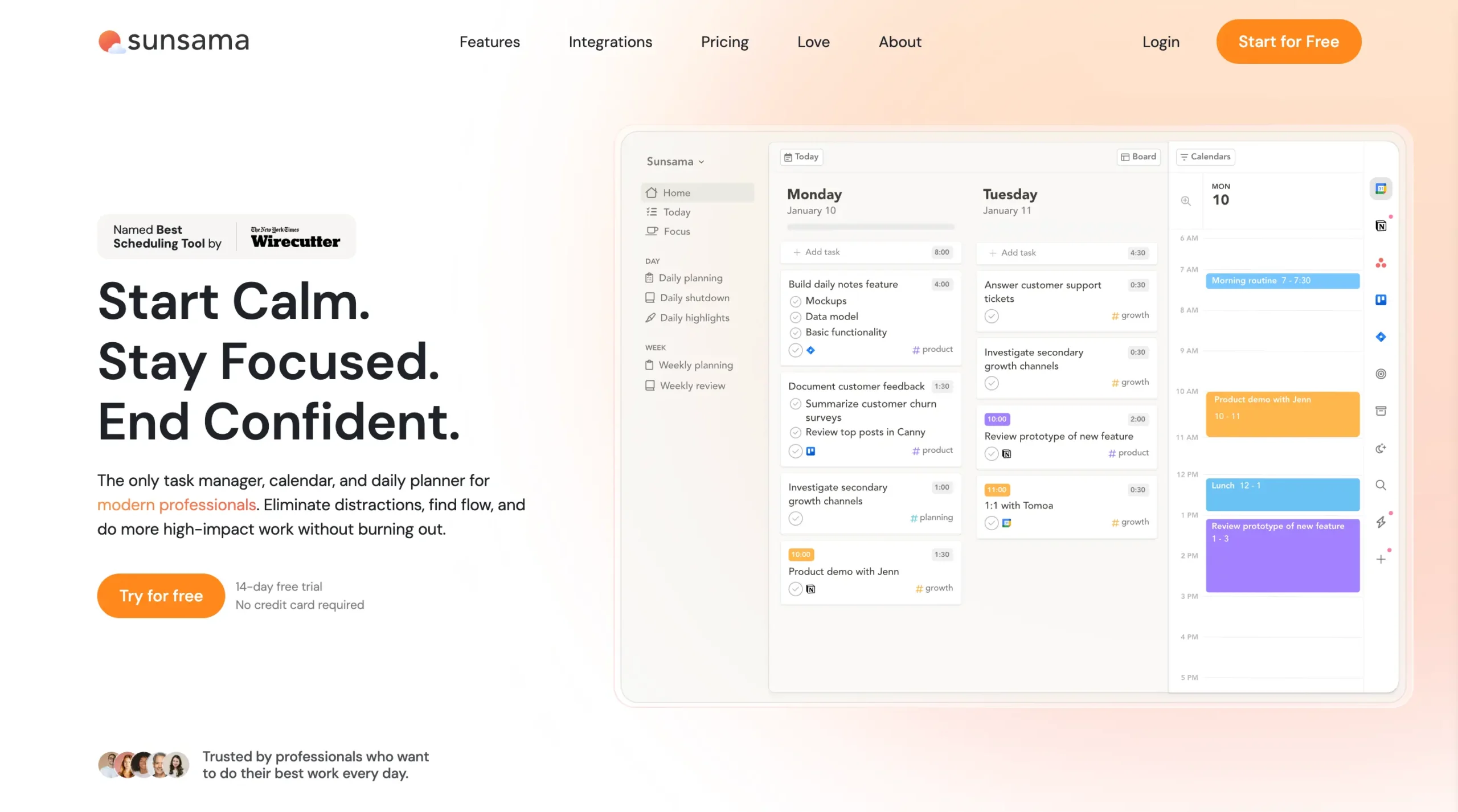
Sunsama homepage

It’s for people who jump between five apps all day and regularly work past 6 PM because they can’t tell when they’ll actually finish.

Who it’s best for:

  • Knowledge workers juggling multiple project management tools
  • People who consistently overcommit and miss deadlines
  • Anyone who wants to stop working at a specific time each day

Standout features:

  • Daily planning ritual that warns you when you’re overcommitted before the day starts
  • 16+ integrations that sync with Asana, Jira, Notion, Todoist, Gmail, and more
  • Shutdown ritual that forces you to actually stop working at your chosen time
  • Time tracking that teaches you how bad you are at estimating (then helps you get better)

Unlike most productivity apps that throw AI at everything, Sunsama makes you do the planning manually. That sounds exhausting until you realize the planning is what makes it work.

How to use the Sunsama discount

Getting your extended trial takes about 90 seconds:

  1. Click the discount link above to access the exclusive 30-day trial
  2. Sign up with your Google or Outlook account (one click, no forms)
  3. Connect your tools during onboarding (optional—you can skip and add them later)
  4. Start your first daily planning ritual the next morning
  5. Use it for a full month before deciding whether to keep it

No credit card required during the trial. If you don’t fall in love with it after 30 days, just walk away.

Sunsama pricing breakdown
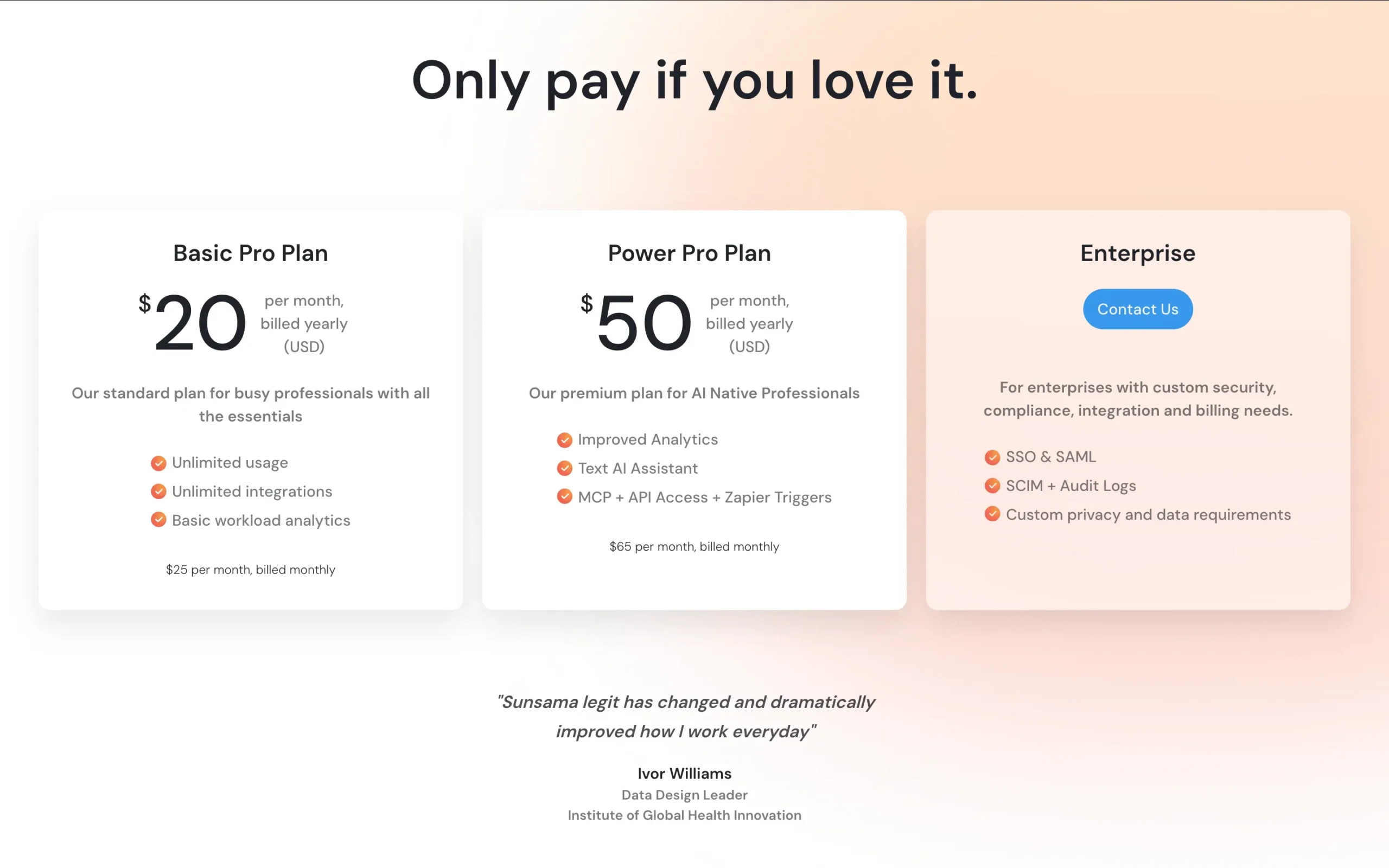
Sunsama pricing

Standard pricing:

  • Monthly plan: $20/month (billed monthly)
  • Annual plan: $16/month (billed $192 annually)
  • Annual savings: $48/year compared to monthly billing

What’s included in both plans:

  • Unlimited tasks and integrations
  • Full access to all features (no tiers or limitations)
  • Daily and weekly planning rituals
  • Time tracking and focus mode
  • Shutdown ritual with AI-generated highlights
  • Sync with 16+ tools (Asana, Notion, Todoist, Jira, Gmail, Slack, etc.)

No hidden fees. No separate “pro” version. You get everything.

If you’re comparing it to free tools like Todoist or Google Tasks, Sunsama is expensive. But if you’re losing two hours a day to context switching and tool chaos, you’ll make the $20 back in saved time within a week.

Why Sunsama is worth it

Most productivity apps are just prettier to-do lists. Sunsama actually changes how you work.

It warns you before you overcommit

You’re building your daily plan. You’ve added eight tasks. Sunsama shows you a running total: 7 hours of work for a 6-hour window.

Right there, before your day starts, it tells you: this won’t fit.

Most people have been lying to themselves about what’s possible in a day for years. Sunsama makes you face it every morning.

That one feature—the overcommitment warning—is worth the entire subscription.

It forces you to stop working

At 6 PM (or whenever you set your shutdown time), Sunsama interrupts you. Time to wrap up.
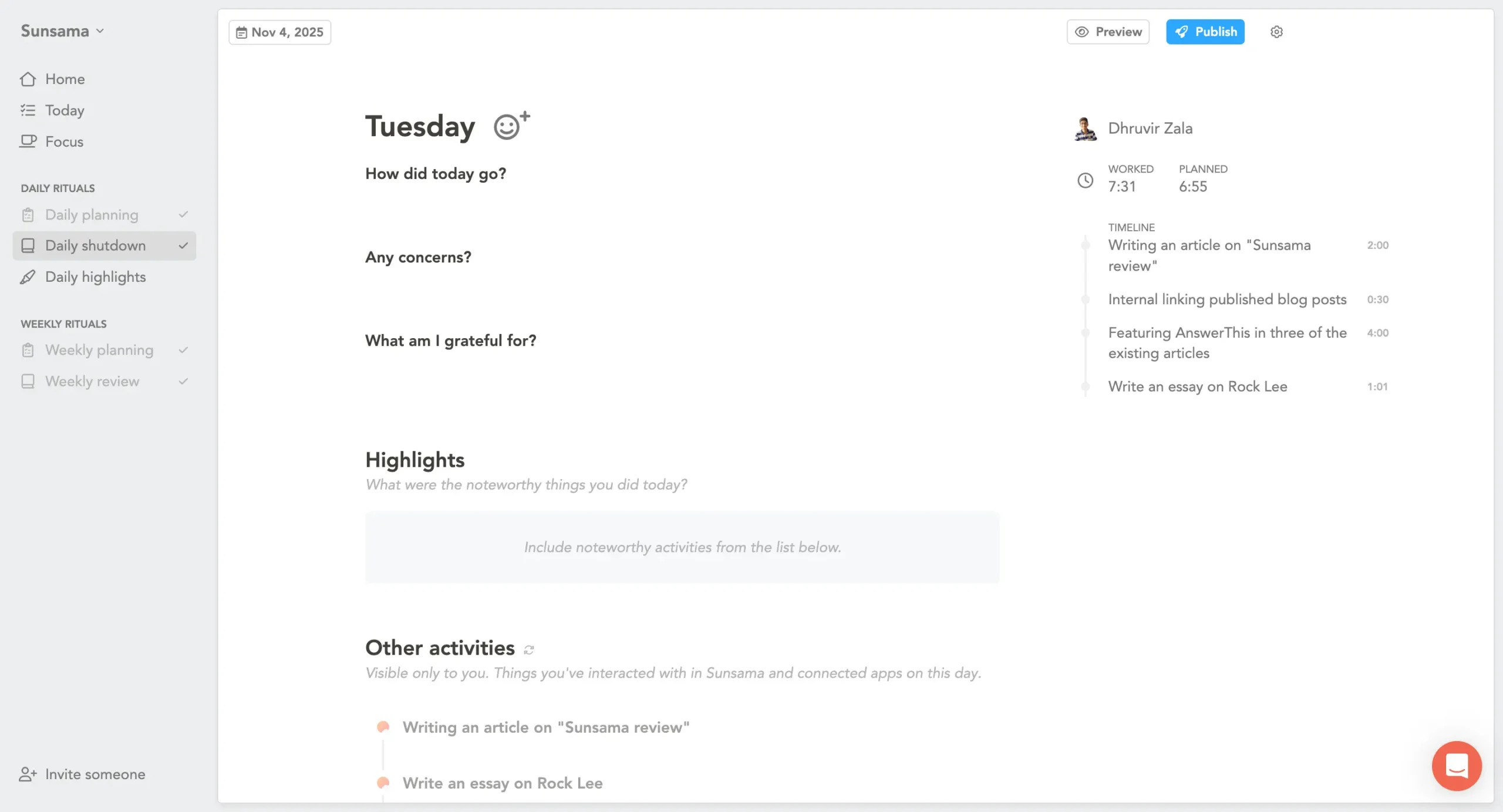
Daily shutdown in Sunsama

The shutdown ritual shows what you accomplished. Then you’re done. Not because your boss told you to stop. Because you made a plan, you executed it, and the day has a clear end.

If you regularly work until 9 PM because you don’t know when to stop, this will change your life.

It replaces five different tools

You probably have tasks in Asana, emails that need action in Gmail, random thoughts in Todoist, and meeting notes scattered everywhere.
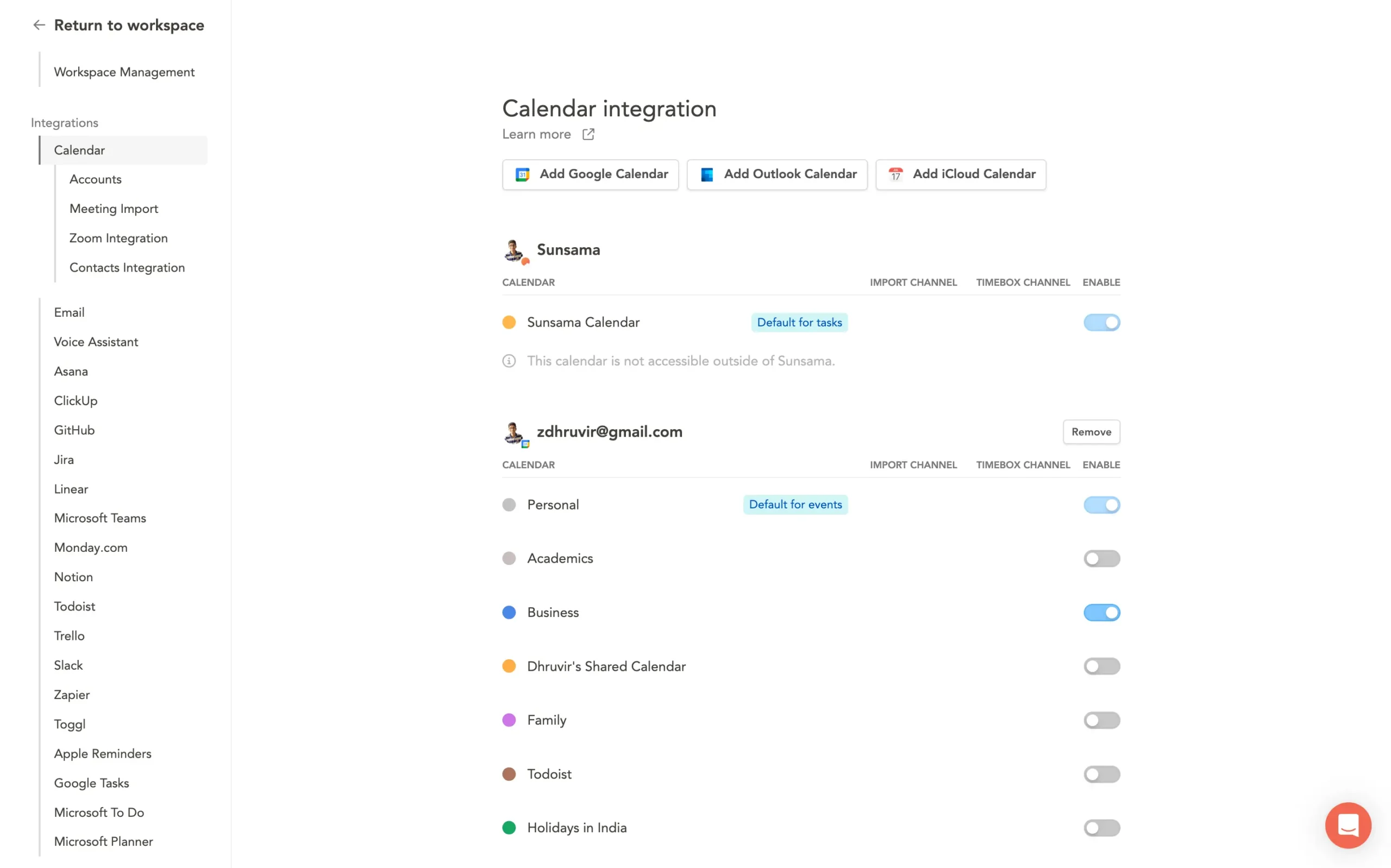
All Sunsama integrations

Sunsama pulls from all of them. One interface. One daily plan.

You’re not abandoning your team’s project management tool. You’re just giving yourself a single place to see everything and decide what actually gets done today.

I’ve been using it for months. I connected Gmail and Todoist. That’s enough for me. If you’re bouncing between Notion, Jira, and ClickUp, it’ll pull from those too.

Real-world outcome

Here’s what actually happened after I started using Sunsama:

I stopped ending the day wondering what I did. The shutdown ritual shows exactly what got done. I stopped overcommitting. When the morning planning says “this is 8 hours of work,” I either cut tasks or accept I’m working late. No more lying to myself.

And I started leaving my desk at 6 PM instead of 8 PM or later.

Not every day. But most days.

That’s worth $20.

Frequently Asked Questions

Does the Sunsama promo code expire?

No. The extended 30-day trial offer is ongoing. There’s no expiration date on the link.

Sunsama doesn’t run limited-time promotions or flash sales. They keep pricing simple and consistent.

Can I stack discounts or use multiple promo codes?

No. Sunsama doesn’t support traditional discount codes at all. The extended trial is the only special offer available.

If you’re looking for a price reduction beyond the trial period, your only option is the annual plan ($16/month instead of $20/month).

What happens after the 30-day trial ends?

You’ll get an email reminder a few days before the trial expires. If you want to continue, you choose monthly ($20) or annual ($16/month) billing.

If you don’t want to continue, do nothing. Your account stays accessible in read-only mode, but you can’t add new tasks or run timers. No automatic charges.

Can I use Sunsama on mobile?

Yes, but not well. Sunsama has iOS and Android apps, but they’re limited compared to the web and the desktop version.

The mobile apps are good for checking your schedule, marking tasks complete, and running timers. But you can’t do the full daily planning ritual on mobile.

If you need full mobile planning, Sunsama won’t work. If you just need to see your plan and track time while away from your desk, it’s fine.


Disclosure: Our content is reader-supported. If you click on certain links we may make a commission.

Dhruvir Zala

Meet your guide
Dhruvir Zala

I help businesses and professionals stop wasting money on the wrong software. Most software reviews are just marketing in disguise. So I started writing the reviews I wish I had: thoroughly tested, brutally honest, and focused on what matters.

Sunsama
30-Day Trial

Wait — Can you tell when you’ll actually finish today?

You’re jumping between five tools. By 3 PM you’ve worked six hours but can’t name one thing you finished. Sunsama pulls everything into one view. Shows exactly when you’ll finish. So you stop lying to yourself about what’s possible in a day.

My readers get 30 DAYS FREELink copied! (normally 14 days) — no credit card needed

Extended trial
No credit card
Cancel anytime
Get 30-Day Free Trial No thanks, I’ll keep working until 9 PM